
Kling AI Video Generator
Kling AI, one of the leading AI video generators, has undergone over 20 iterations and is famed for its ability to deliver highly realistic visual fidelity and cinematic-level content that rivals OpenAI's Sora. You can try Kling AI free, right here.
Key Features of Kling AI
- Text and Image-to-Video: Create videos your way, using either text or video input as the basis.
- Motion Brush: Add motion to specific elements of your videos, controlling speed and direction.
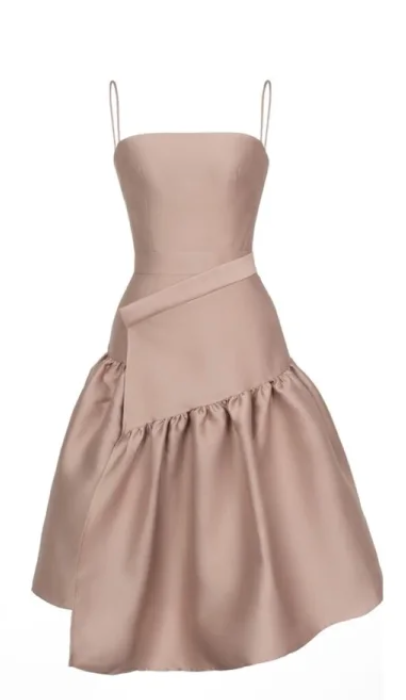
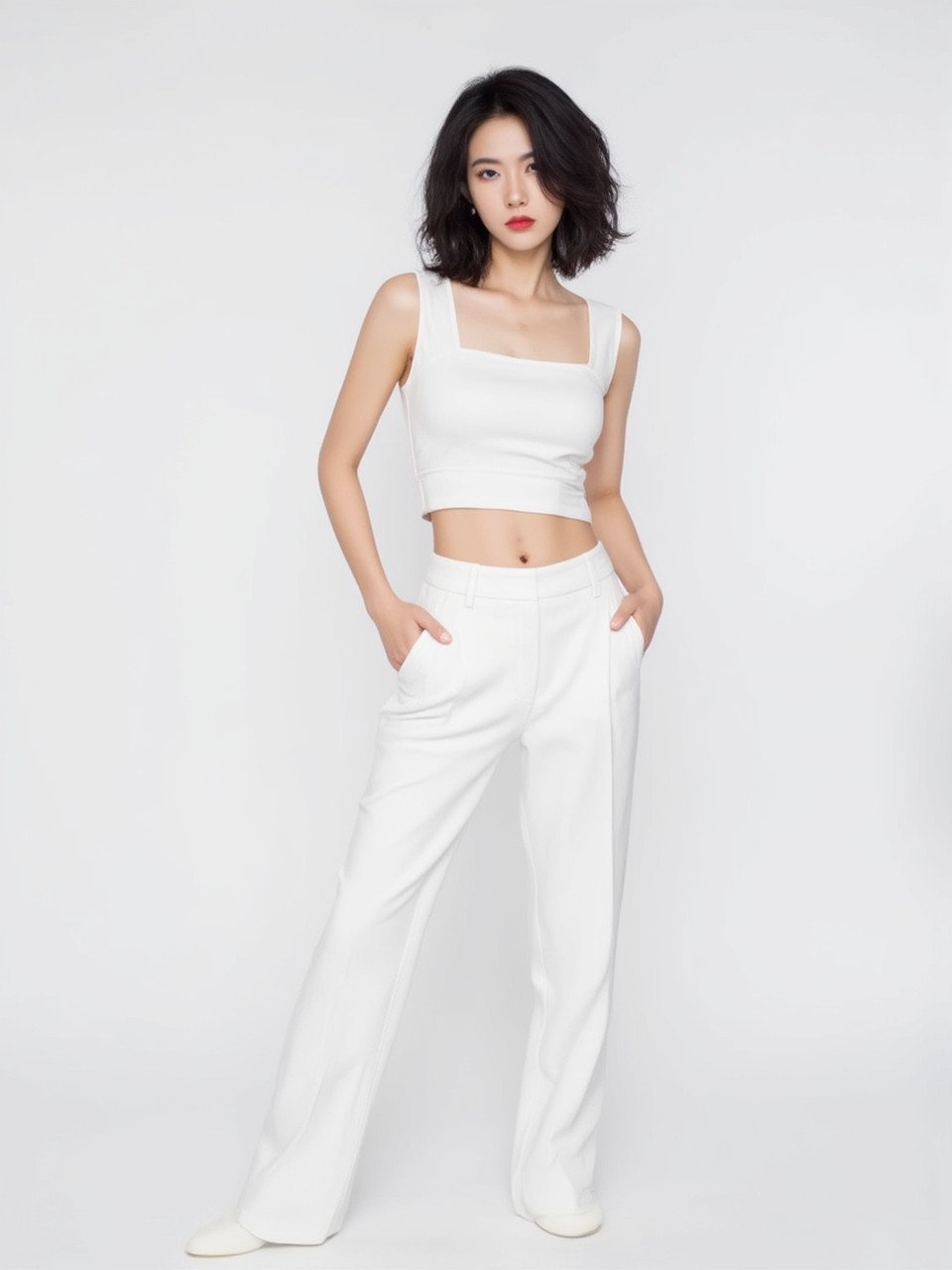
- Virtual Try-On: Dress up yourself, your friends, or other people you know in fun and fashionable outfits.
- Kling Elements: Create consistent character videos by inserting the same elements – characters, objects, and more.
- Lip Syncing: Add speech audio to your AI videos and synchronize the sound perfectly with realistic lip movements.
Bring Text and Images to Life
Kling AI supports both text and image-to-video creations. Thanks to that, you can make videos whichever way you please, either inputting a simple text prompt to describe the clip you want to see, or using one or more reference images that Kling AI can bring to life, with the power of AI. Whichever option you choose, you can enjoy realistic visuals and immense detail in every frame.
| Prompt | Generated Video |
| On an alien planet, a cyberpunk cityscape unfolds, with futuristic architecture. The camera slowly moves forward, revealing pedestrians on the streets. | |
 |
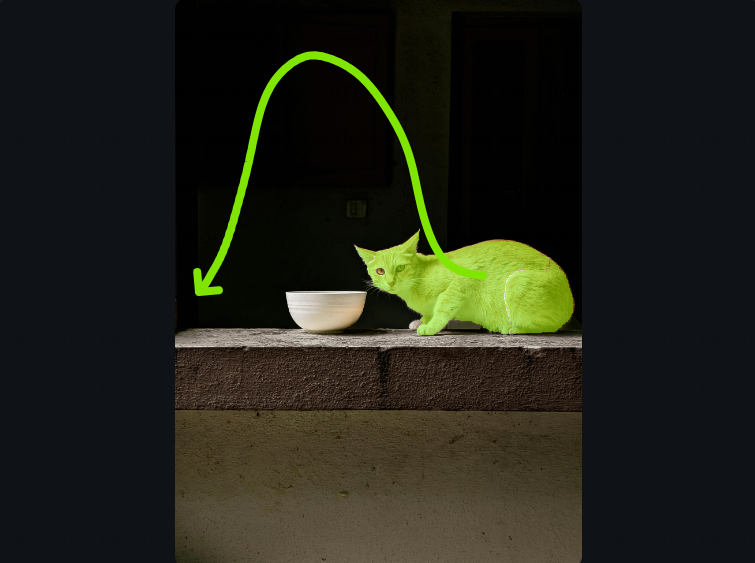
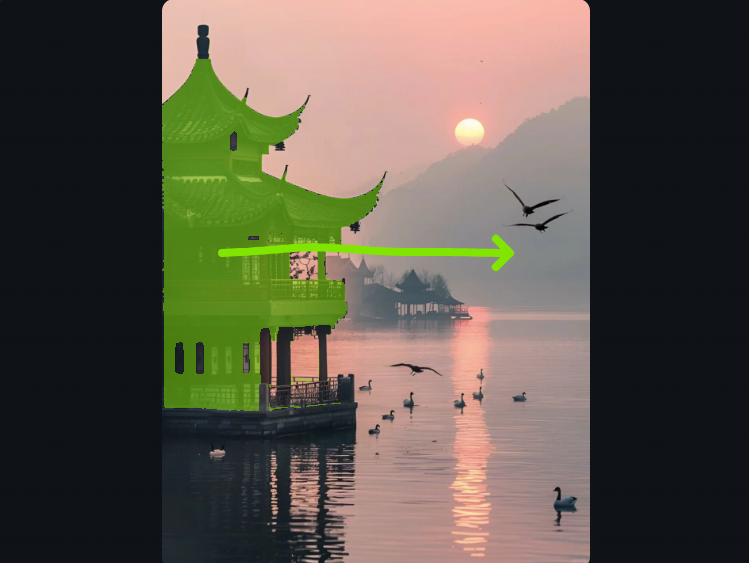
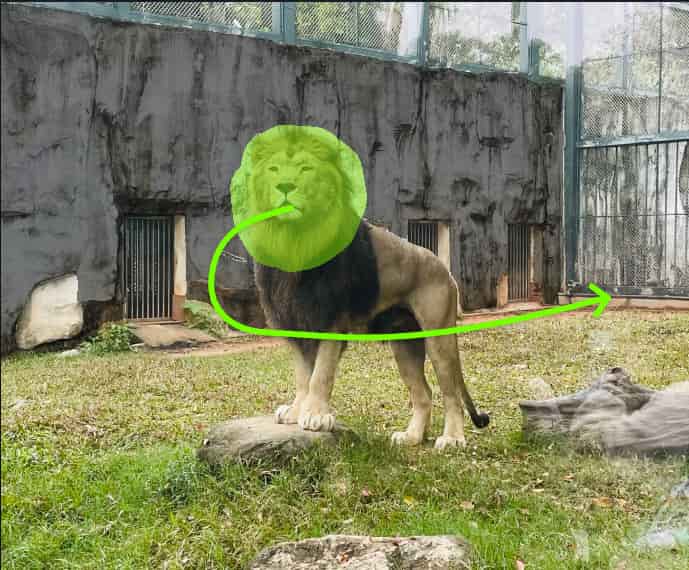
Add Dynamic Movement with Motion Brush
This feature lets you add movement to specific parts of your videos. You can control how fast or slow these parts move and which direction they go.
| Sample image with Motion Brush applied | Output video |
 |
|
 |
|
 |
Dress Up Yourself or Anyone Else with Virtual Try-On
Test out the Kling AI Virtual Try-On feature. With this, you can use AI to dress up yourself, your friends, family, or anyone else you can think of, however you like.
You can see yourself wearing fancy dresses, suits, swimsuits, and more, creating cool catwalk-style videos for social media, or dress up images of people you know and watch them come to life before your eyes.
| Garment image | Model image | Output video |
 |
 |
Add Elements for Consistent Video Creation
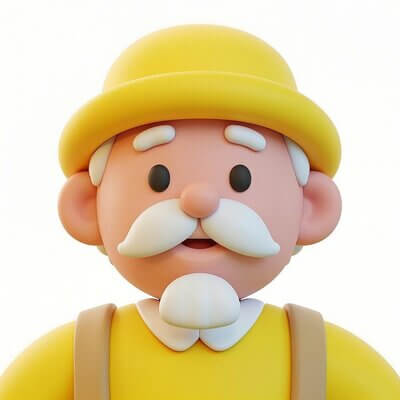
Through the power of Kling AI Elements, you can enjoy total control over your videos and even create multiple clips with the same consistent characters, subjects, objects, or settings.
Simply click to upload images of the items or characters you want to include, or use the Stock Library available with Kling, and let the AI do the rest. It’s the perfect way to make the exact clips you desire.
| Input | Output video | |
 |
 |
|
 |
Prompt:
Prompt: In a café, a cartoon-style elderly man lifts a cup to drink coffee. |
|
Bring Characters to Life with Lip Syncing
Kling AI's lip syncing adds speech audio to your videos and matches the lip movements perfectly, making the talking look natural.
| Original image | Speech text | Output |
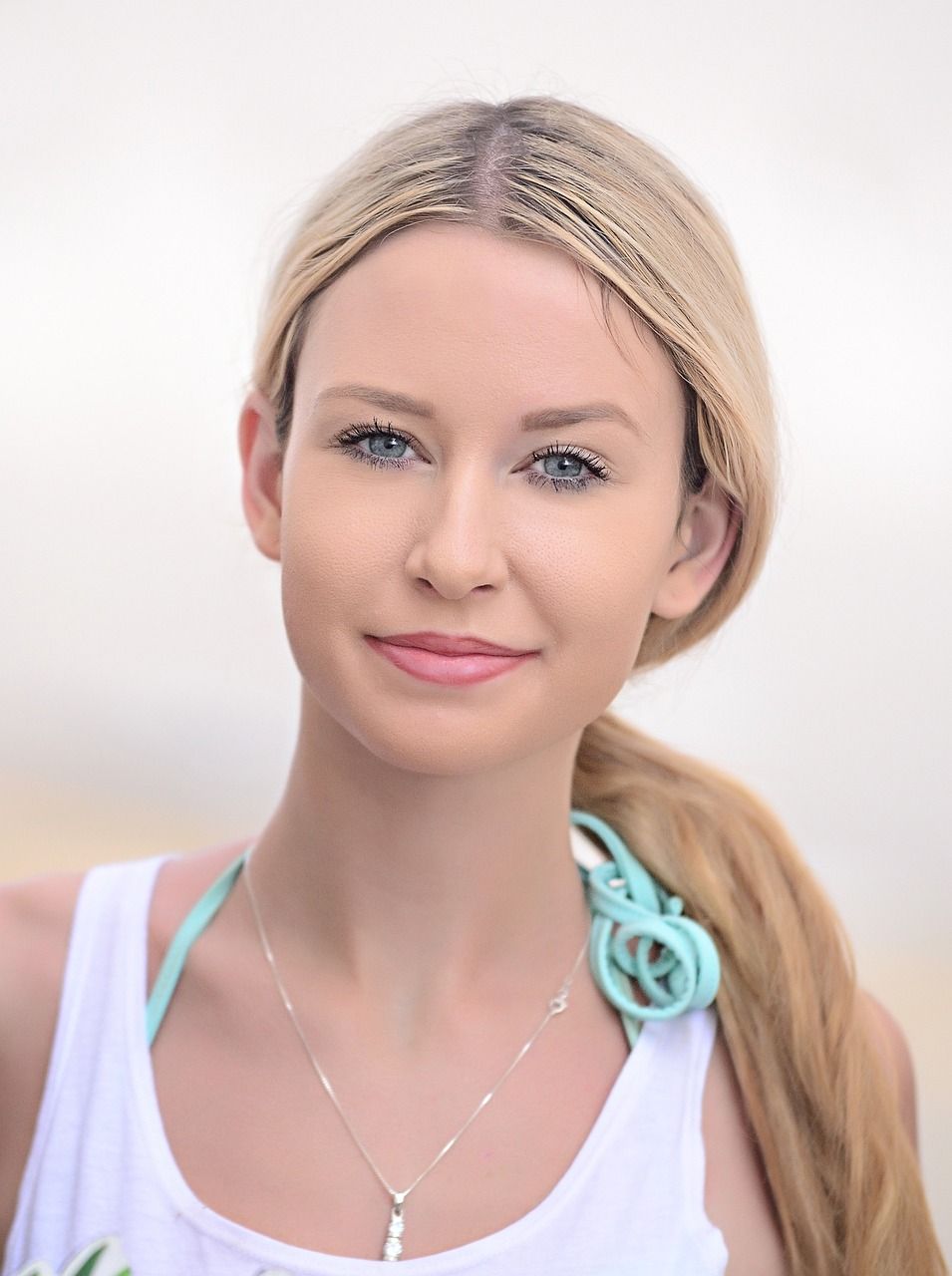 |
Hello everyone! Let's embrace today with positivity and purpose.
Together, we can achieve great things! |
Kling AI vs Other AI Video Models
| Spec | Kling AI | Seedance 2.0 | Google Veo 3.1 | OpenAI Sora 2 | PixVerse AI | Vidu AI | Hailuo AI |
| Core strengths | Strong motion realism, physics-aware movement, and cinematic image-to-video. | Multimodal control, cinematic multi-shot generation, and native audio sync. higgsfield+2 | Strong realism, control, and synchronized audio. | Strong realism and synchronized audio. | Real-time interactive generation, strong audio-visual consistency, and multi-shot storytelling. | Semantic accuracy, visual aesthetics, and multi-entity consistency. | Cinematic quality, character consistency, and motion fidelity. |
| Resolution | Up to 1080P | Up to 2K | Up to 4K | 720P, 1080P | Up to 1080P | Up to 2K | Up to 1080P |
| Length | Up to 15s | Up to 15s | 8s | Up to 12s | Up to 10s | Up to 16s | Up to 10s |
| Audio | Yes | Yes | Yes | Yes | Yes | Yes | Yes |
| Best for | Cinematic shots, realistic motion, character-focused scenes. | High-control cinematic video, multi-modal storytelling, and multi-shot scenes. higgsfield+2 | High-end cinematic or marketing video. | General-purpose generative video. | Interactive, social, and production workflows needing speed plus control. | Fast short clips, consistent characters/subjects, and flexible input types. | Character-driven storytelling, cinematic motion, and consistency-focused clips. |
How to Use Kling AI on HIX AI
Select Your Model
Go to HIX AI image-to-video generator and choose from any of the available Kling AI models, including Kling 1.0, 1.5, and 1.6.
Enter a Prompt/Upload an Image
If you want to use text to video, type in your prompt. For image to video, upload an image, and adjust the settings exactly as you want them.
Click to Create
Click the “Create” button and watch your video come to life before your eyes. You can save and share it directly.
Kling AI Reviews on YouTube
What Reddit Users Think of Kling AI
What People Are Talking About Kling AI on X
This is AI , unbelievable to be honest , Kling 2.0 is on another level 🔥
— AshutoshShrivastava (@ai_for_success) April 16, 2025
It is now live on ChatLLM , Kling 2.0 has low censorship and the highest quality AI video gen I've seen yet.
20-sec guide how to use it 👇 pic.twitter.com/uAZrNWtjoH
Unleash the WILD 🔥
— SANI BULA (@SaniBulaAI) April 21, 2025
Kling 2.0 catapults AI videos into the surreal. 🤯
I've crafted a mesmerizing flight scene with Kling AI 2.0
Turning dreams into reality with a sprinkle of AI magic. Dive into flawless editing with the Multi-Elements Editor—effortlessly add, erase, and swap… pic.twitter.com/nuTCJjFHz1
The Internet is buzzing, and AI video just broke new ground!
— FELIX (@FellMentKE) April 22, 2025
This week, AI blurred the line between reality and illusion. With Kling AI’s Multi-Elements editor, seamlessly add, delete, or swap video elements.
Unleash your creativity and bring any video to life with Kling AI.… pic.twitter.com/jYrGFQBKPh
🌞 gmmm! sunday, sunday, sunday! this weekend flew by! working on a couple fun videos for later, hopefully I can finish them up! have a wonderful day, wherever you are, doing whatever you're doing! 🫶
— Weird AI Art (@weirdai_art) May 18, 2025
📸 @ChatGPTapp for the image
🎥 @Kling_ai 1.6 pro on @vadooai
🔊 MMaudio pic.twitter.com/JtOUBtnaNV
Trending Airbnb-style animated icon.
— Kanishk Dubey (@xlauncherx7) May 16, 2025
Generated with ChatGPT and KlingAI.
Dive into the tutorial!🧵 pic.twitter.com/nuCP3WdhAE
Good morning there everyone, hope you have a great day. I tried the new Kling AI feature again, and I really like it, is really fun to play with, although is not perfect, but is only the beginning😉Okay, next time I will share prompts, I promise 😁 pic.twitter.com/pdTzyRG0mY
— Alin (@Alin_Reaper05) January 23, 2025
This single AI tool can your image your animation.
— Beginnersblog (@beginnersblog1) May 9, 2025
It uses different models from top AIs like...
- Wan 2
- Veo by Google
- Pika
- Kling
- Runway Gen-3
Here is how each of these models turn image into a 5 second video.
SEE the results of a few... 👇 pic.twitter.com/apBVtmaNnr
ChatGPT × Kling で “amigurumi”
— GENEL | 動画生成AI (@genel_ai) May 14, 2025
「編みぐるみを、AIで絵本風アニメに」 pic.twitter.com/l8QVDHEmBj
Part 7 of my latest Fantasy video.
— Orcton (@OrctonAI) May 11, 2025
Created using @Kling_ai
❤️🖤❤️ pic.twitter.com/F37uFkoYYi
FAQs
Is a Kling AI subscription worth it?
Is a Kling AI subscription worth it?
It depends on whether you intend to use this AI video generator quite a lot. If you have professional plans in mind, for example, and want to make a lot of high quality AI videos on a regular basis, it may be worth signing up for a premium subscription. However, for the best value, it’s better to sign up for a premium HIX AI plan instead. This will give you full access to not only Kling AI but lots of other AI video generators, so you can switch between them and make all the AI videos you need, exactly as you want.
Are Kling AI videos private?
Are Kling AI videos private?
Kling AI has a strict privacy policy and states that it will only share user data with third parties on a need-to-know basis. Additionally, premium subscribers have total control over the videos they create and can make them private or public, as they choose. If you opt to make your videos public, then other people may be able to watch and save them, but if you make them private, then only you and the people you share them with will have access.
How long is the Kling AI video?
How long is the Kling AI video?
Kling AI videos can run for a maximum of two minutes in total. Many videos made with this tool are much shorter than that, running for just a few seconds, but you can use the Kling AI Extend Video feature to make them longer, if you like.
Is Kling better than Sora?
Is Kling better than Sora?
Opinions vary on this matter, with some users preferring Kling because of its flexibility and customization options, and others saying that Sora is better because of its superior visual fidelity. Both are great and worth trying, and you can test them out for free through HIX AI.